Download free market data from Yahoo! Finance
Alternatives for finding a stock on Yahoo! Finance
Direct link is a link within Chartoasis.com that points directly at a free market data provider's subpage of a stock where you can start downloading market data.-
You can find direct link to a stock in the table below or on a country's stock data download page.
If you have a direct link to the Yahoo Finance page of the stock you are looking for, open it in a separate browser window then proceed with the "Download historical data" section. - If you haven't found the wanted stock's direct link you can search for it by name or by ISIN code as described in the "Searching for stocks on Yahoo! Finance by name or ISIN code" section.
- Or you may perform a search on a certain exchange's stock list as described in the "Browsing exchanges supported by Yahoo! Finance" section.
| Full name | Ticker | Link |
|---|---|---|
| Advanced Micro Devices Inc. | NYSE: AMD | Download link for Advanced Micro Devices Inc. |
| American Express Company | NYSE: AXP | Download link for American Express Company |
| Bank of America Corporation | NYSE: BAC | Download link for Bank of America Corporation |
| Boeing Co. | NYSE: BA | Download link for Boeing Co. |
| Caterpillar Inc. | NYSE: CAT | Download link for Caterpillar Inc. |
| Citigroup, Inc. | NYSE: C | Download link for Citigroup, Inc. |
| Eastman Kodak Co. | NYSE: EK | Download link for Eastman Kodak Co. |
| General Electric Co. | NYSE: GE | Download link for General Electric Co. |
| General Motors Corporation | NYSE: GM | Download link for General Motors Corporation |
| Intel Corporation | NasdaqGS: INTC | Download link for Intel Corporation |
| McDonald's Corp. | NYSE: MCD | Download link for McDonald's Corp. |
| The Coca-Cola Company | NYSE: KO | Download link for The Coca-Cola Company |
| Walt Disney Co. | NYSE: DIS | Download link for Walt Disney Co. |
| Yahoo! Inc. | NasdaqGS: YHOO | Download link for Yahoo! Inc. |
Searching for stocks on Yahoo! Finance by name or ISIN code
ISIN: International Securities Identification Number, a code that identifies a stock uniquely. A stock has different ISIN code for each stock exchange it is traded at. For more information see ISIN code's Wikipedia page. You can get a stock's ISIN code eg.: from the exchange where it is traded. Searching for stocks by ISIN code on Yahoo! Finance is much easier and safer than searching by name because the chance of finding the wrong stock is very small.To find a stock on Yahoo! Finance,
- Visit http://finance.yahoo.com.
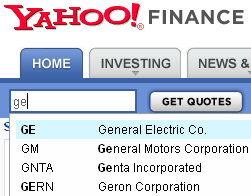
- Enter the name or a part of the name of the wanted stock into the textfield on the top of the page until the complete name pops up in the list, then click "Get Quotes" OR enter the entire ISIN code of the stock and then click "Get Quotes".
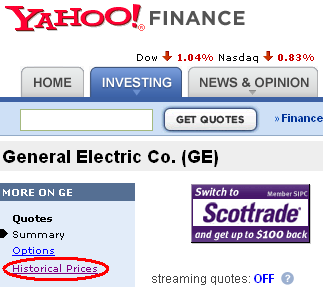
- Click "Historical Prices" on the next page. Proceed with "Download historical data".
Browsing exchanges supported by Yahoo! Finance
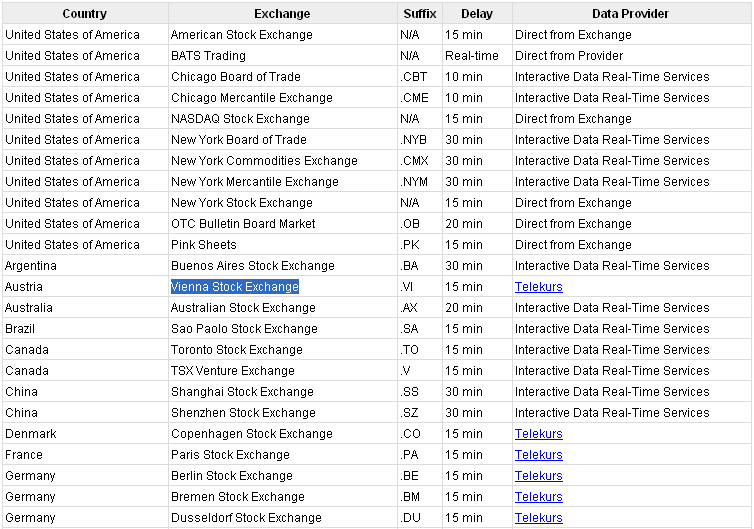
You can try finding a stock through the stock exchange it is traded at. To do so you have to filter to the securities traded on that exchange. Filtering to a stock exchange is easy because most exchanges have a typical Yahoo! Finance ticker ending, like '.VI' belongs to Vienna Stock Exchange (column 'Suffix', see below). List of exchanges supported by Yahoo! Finace can be seen at http://finance.yahoo.com/exchanges. Lets search for Bet and Win traded in Vienna Stock Exchange as an example:
 |
You can perform a search on Yahoo! Finance just by the typical ticker ending. To do so visit http://finance.yahoo.com, and enter '.VI' into the search field similar to the picture below to get a list of stocks traded on Vienna Stock Exchange.
 |
If you click "Get Quotes" you get the following results (the securities traded on Vienna Stock Exchange):
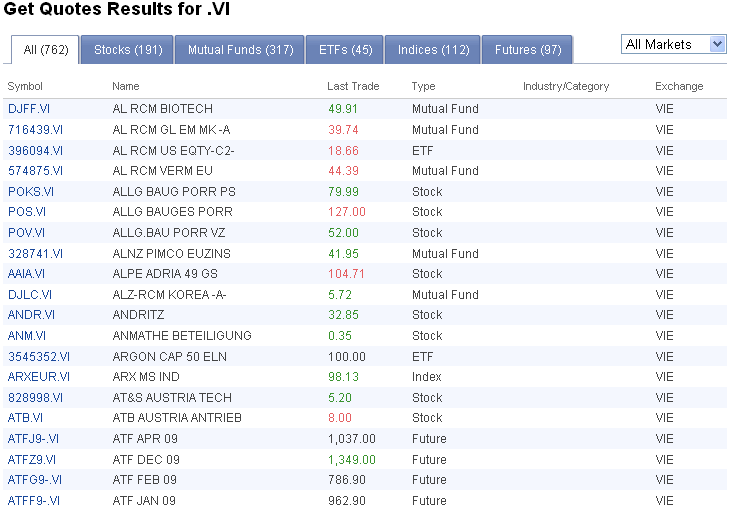 |
When looking for stocks only you can filter search results by clicking "Stocks" instead of "All". The wanted stock can be found by turning some pages, then you can navigate to the stock's Yahoo! Finance page by clicking on its name (in this case we are looking for BWIN).
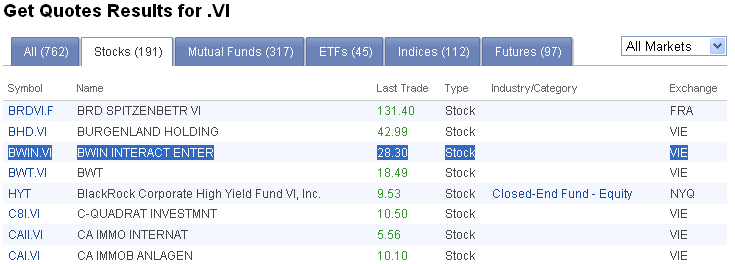 |
In the next page (see below) click "Historical Prices". Proceed with "Download historical data" section.
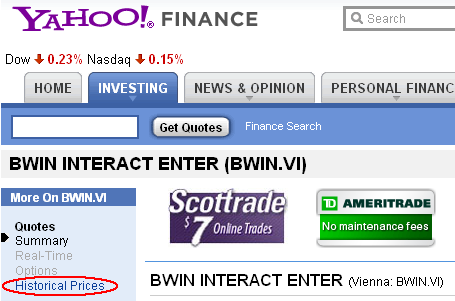 |
Download historical data
- On the next page you can set up the time interval's "Start Date" and "End Date" (this interval will be in the downloaded data file). Keep the resolution "Daily" (weekly data is calculated by Chartoasis.com's chart software), "Start Date" and "End Date" is freely configurable. "End Date" is always the actual date by default.
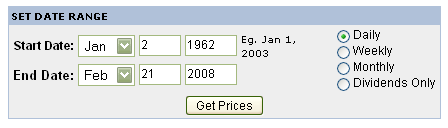
- Click "Download to spreadsheet" link on the bottom of the page to download the data file.
We recommend to change the name of the file you are downloading since it is always the same (table.csv) by default.
Save text file directly to your hard drive, do not allow Excel (or Open Office etc.) open it! (Saving to HD from Excel would make data format unreconizable.)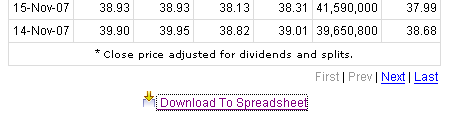
Hint: if you save the page where you have just downloaded data from to the "Favourites" or "Bookmarks" you do not have to do all the searching process again but you can navigate to the page of the data download directly by recalling it from the "Favourites" or "Bookmarks".