Frequently asked questions (F.A.Q.)
Technical questions
Which browsers are recommended for the site?


We recommend Mozilla Firefox 3, Internet Explorert (in case of IE 8 combined with compatibility view), Opera or Google Chrome, with at least 1024x768 screen resolution.
I use Internet Explorer 8, pages of Chartoasis.com look bad and appear with errors, what shall I do?
If pages of Chartoasis.com look bad with Internet Explorer 8 (IE8) try turning on IE8's compatibility view. (Compatibility view shows webpages like Internet Explorer 7.) To turn on compatibility view click the button on the left of the refresh button (that looks like the emphasized button on below image) :
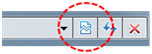
Chart software of Chartoasis.com
Chart software of Chartoasis.com appears with improper size (too large or too small), what shall I do?
Chartoasis.com attempts to resize chart software to fit to your screen resolution. This is done with the help of cookies. In case of cookies or javascript are not allowed in your browser, chart software will appear with a default size which fits screen resolution of 1024x768. To enable javascript, please visit this link. To enable cookies view this link.
Chart software of Chartoasis.com is not working, what shall I do?
You need Java to run our chart software. For instructions on getting Java please visit our Java install guide. For more informations on how to use chart software please visit the Help.
Getting updates of the stock analysis software (How to get latest version?)
Our team is continuously working on making Chartoasis.com's chart software better so the software is updated regularly. The Java environment always checks if there is a newer version of the chart software on the server of Chartoasis.com and runs that one. If despite Java's automatic update you experience that a just announced feature is missing from the chart software you run on your local computer do the following:
- Click the Java icon in Control panel (either Start menu/Control panel or Start menu / Settings / Control panel - if you are in "Category view", change to "Classic view"). Click the Settings button in the "Temporary Internet files" section (in the bottom).
- Uncheck "Keep temporary files..." (but keep "Temporary Files Settings" window open) and restart your browser. Check Chartoasis.com's chart software whether it contains the necessary modifications.
- If above step does not solve the problem removing all Java applets and other applications from the temporary storage (cache) may be the solution. Click "Delete files" and check and check "Applications and applets" if possible, then click OK. This will delete all Java applications and applets from the cache. Later these will always be donwloaded before using them ensuring that always the latest version is used. Restarting the browser may be needed after this step as well.
Missing function
Having ideas about the further development of the chart software? Contact us through [email protected] e-mail address.
Why Java?
Chartoasis.com's chart software is using Java applet technology just like some internet banking applications. Programs written in Java are run on a virtual computer which allows execution on multiple platforms like Windows or Linux. If your computer does not have proper Java support, our site offers the installation of it any time you attempt to start Chartoasis.com's chart software. If Java is not installed automatically pleas follow the instructions of the Java install guide.
From users point of view this solution has the benefit that there is no chart software you should install on your computer - it is accessible from home, from your office etc. You will receive software updates automatically since Java always checks our server if there is a newer version of the chart software. (If you experience that software is not updated please check out the "Getting updates of the stock analysis software" section)