NSE data download guide
Chartoasis.com recommends downloading market data for stock market of India from http://nseindia.com/, because data is more up to date there. Data format of NSE India is recognized by Chartoasis Chili automatically.
We are going to explain downloading market data from NSE through an example. In the example we are looking for ICICIBANK's historical data in NSE India's data.
Finding an equity in NSE India's database is the easiest using the equity's symbol. If you don't know the NSE symbol for your equity, please look it up here or here.
Steps for downloading
- Visit NSE India's data download page.
- Enter the symbol and set the time range to maximum (24 months).

- Click on the "Get data" button! (This will update the table below.)
- Click on the "Download file in csv format" link!

- Download the historical data file in the upcoming window. Do not forget to specify a file name that is easily recognized, like "icicibank.csv".
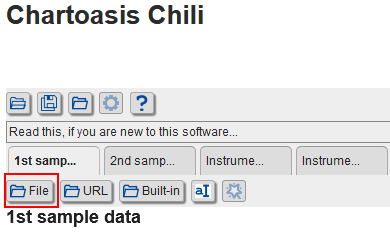
- Visit Chartoasis Chili, and load the newly downloaded "icicibank.csv" using the file loading link in the application: